
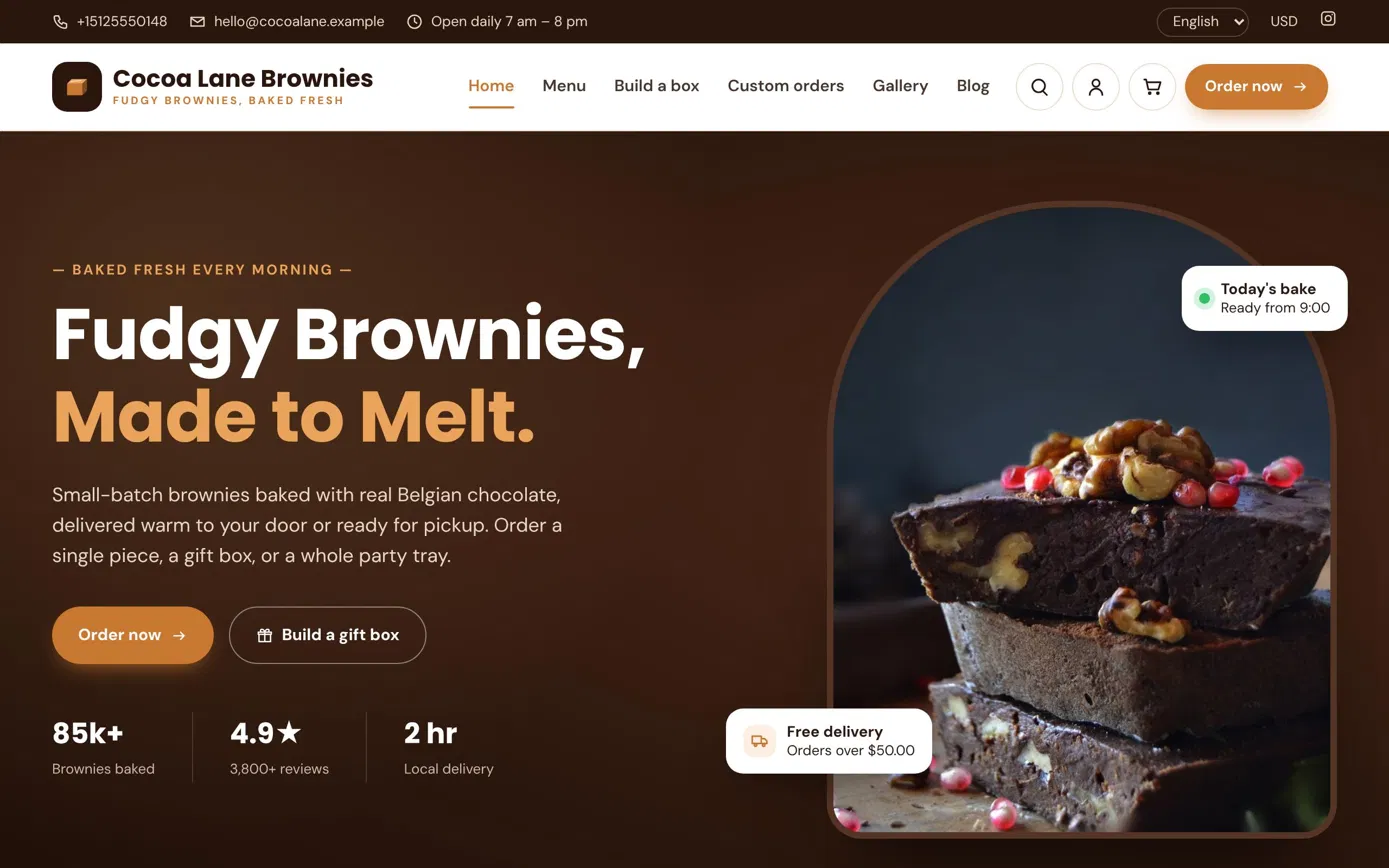
BakeBox is the website and order book for brownie makers, home bakers and small cake shops. Customers order for a day and a time — delivery or pickup — and the website never sells more than your kitchen can bake that day. Every morning the bake list tells you exactly what to bake, how much goes into boxes, and who collects what when. No more orders in WhatsApp chats, a notebook and your memory.
Ordering that knows your oven
Set the pieces you can bake a day (a box of 6 counts as 6); when a day is full, checkout offers the next
Closed days, holidays and bigger bake days (two bakers on Saturday) in a calendar
Delivery and pickup time windows with order cut-offs and an optional limit per window
Days' notice per product (a party tray needs 3 days, a brownie none); same-day orders close at your time
Two customers buying the last pieces at the same moment can never both get them
Your bakery's website
A home page made for food: big banner, your promises, best sellers, the gift-box builder, about you, reviews, a custom-order form, gallery, blog and newsletter
Products with options (single piece, box of 6, box of 12), pictures, ingredients, allergens and tags (eggless, vegan, nut-free…)
Build-a-Box: customers pick a size and fill it with their own flavours, with a gift note
Coupons and offers (10 % off the first order, free item, minimum order), delivery charges by area
Guest checkout or customer accounts; order page and tracking by order number and phone
Two themes (Cocoa and Strawberry Cream), your logo, hours and social links; made for phones; search-engine ready (sitemap, structured data for a bakery and its products)
English, Sinhala and Tamil: customers pick their language; menus, checkout, order page, order emails and text messages follow it — even the emails sent later when you confirm the order. Your home page, products and pages can have their own words in each language
Website only, with one switch: no cart or checkout — customers see every product and option and ask on WhatsApp, call you or send a custom-order request; show prices or "Price on request"; the admin keeps only what a website needs. Switch online ordering on whenever you are ready
Running the kitchen
Bake list for any day: products with loose pieces and pieces in boxes, orders by time slot, gift notes — printable for the kitchen wall
Orders by today, tomorrow and later; confirm, record payment, start baking, ready, out for delivery, collected — every step recorded
Move an order to another day (its pieces move with it), take phone orders, print order slips, message the customer on WhatsApp
Unpaid bank transfers cancelled automatically after the hours you choose, their pieces back on sale
Dashboard: today's orders, pieces booked, this month, average order, and what is waiting on you
Reports for any period: sales, paid and still to collect, by day, by product, by payment method, delivery or pickup, website or phone, and offers used — each section as CSV for Excel
Payments and messages
Cash on delivery or at pickup, bank transfer with your instructions, PayHere cards (LKR and USD), Stripe cards (USD, GBP, EUR, AUD and other two-decimal currencies) — orders turn paid by themselves
Paid twice or paid after an order expired: never lost — flagged "refund due" and emailed to you
Order emails at each step; texts by SMSlenz; WhatsApp with your approved templates
Loyalty that brings customers back
Points on every completed order for customers with an account, spent at checkout like store credit (up to the share you choose); every Nth order brings bonus points; a cancelled order gives points back
Balance, history and progress to the next bonus on the customer's account page; add points by hand with a reason (a birthday, a complaint put right)
Built for shared hosting
Upload the zip, open your domain, follow the web installer — no SSH, no Composer, no Node; one cron line
Load a full sample bakery from the browser to try everything first
Updates from the admin: upload the new version; your orders, photos and settings are never touched
Staff roles (owner, manager, counter, baker) and an activity log
Requirements
PHP 8.2+ with pdo_mysql, mbstring, openssl, tokenizer, xml, ctype, fileinfo, curl, gd, intl and zip; MySQL 5.7+ or MariaDB 10.3+; Apache or LiteSpeed with .htaccess; one cron job; HTTPS; an email account
What's included
The full PHP source, the web installer, the sample bakery with drawn sample pictures, the user guide, the installation and update guides
Updates and support: OWNER (as the update policy and support terms say)
Not in this version (said plainly)
Card gateways other than PayHere and Stripe; languages other than English, Sinhala and Tamil (staff screens are English); ingredient stock or recipe costing; a point-of-sale counter screen
Create an empty MySQL database and a user for it in your hosting panel.
Upload the BakeBox zip into your domain's folder and extract it there.
Open your domain — the installer starts: server check, database, then your bakery (pieces a day, kitchen name), your owner sign-in and the licence key from your CodeCrate account.
Add the one cron job (every minute) the last screen shows.
Sign in at /admin. The dashboard lists the first steps; Shop details → "Load the sample bakery" fills everything with examples to try first.
Updates: download the new zip from your CodeCrate account and apply it from Bakery settings → System update.
Same text as USER-GUIDE.md, which also ships inside the zip.
BakeBox is your bakery's website and order book in one: customers order for a day and a time, the website never sells more than your kitchen can bake that day, and each morning the bake list tells you what to bake and who collects what when.
Sign in at yourbakery.com/admin. Menu names below are as they appear in the admin.
1. How ordering works
The customer picks products (single pieces, boxes of 6, trays…) or builds a gift box with their own flavours.
At checkout they choose delivery or pickup, then a day and time. Closed days and days too soon for the products' notice are not offered; a day without room for their order shows Fully booked and cannot be picked.
They pay by the methods you switched on, add an optional gift note, and get an order number and a private order page. They can track it later with the number and their phone or email.
Every order books its pieces on that bake day. A box of 6 is six pieces. When a day is full, the website offers the next day. Two customers checking out for the last pieces at the same moment can never both get them.
2. Your kitchen
Bakery settings → Ordering & delivery → Kitchen and ordering days
Pieces the kitchen bakes a day — your normal daily capacity.
Days you never bake — e.g. Monday.
Same-day orders close at — after this time (your shop time), the earliest day is tomorrow.
Customers can order this many days ahead.
Kitchen → Baking days — change a single day: close it (holiday), or give it more or fewer pieces (two bakers on Saturday). Recount rebuilds a day's booked pieces from its orders if you ever doubt it.
Kitchen → Delivery & pickup times — the time windows customers choose from (Morning 9–12…). For each: delivery, pickup or both; the weekdays it runs; how long before it starts orders close; and an optional maximum number of orders.
Each product has days' notice (Menu → Products): a wedding tray might need 3 days, a brownie 0. In a cart with several products, the longest notice wins.
3. Every day: the bake list
Kitchen → Bake list (also the Bake list button on Orders)
58 of 240 pieces booked and what is left to sell today.
To bake: each product with loose pieces and pieces going into boxes, and how many orders.
Orders by time slot, in the order the day runs, with gift notes.
Day before / Day after, any date, and Print for the kitchen wall.
- Version 1.4.1 — first release
- Added
- Bakery website with Build-a-Box gift boxes, options per product, allergens and tags
- Ordering for a day and a time with bake-day capacity, delivery and pickup windows, days' notice
- Orders from website and phone, bake list per day, every step recorded; move orders between days
- Coupons, delivery charges, cash on delivery, bank transfer, PayHere and Stripe cards
- Order emails, SMS and WhatsApp messages
- Blog, gallery, custom-order requests, reviews, newsletter; two themes; logo, hours and social links
- Website only mode (no online ordering, optional "Price on request")
- English, Sinhala and Tamil for the website, order emails and texts
- Loyalty points and repeat-order rewards
- Reports with CSV: sales, paid, by day, product, payment method, delivery or pickup, offers
- Staff panel with a button-style sidebar; your own browser icon (favicon)
- Web installer, sample bakery from the browser, updates from the admin, staff roles
Do I need coding knowledge to install this?
Will it work on shared hosting?
How many domains does one licence cover?
What payment methods do you accept?
Does it work on mobile?
Are updates included, and for how long?
Is my data safe / where is it stored?
Can you customise it for me?
What support is included, and for how long?
Do you offer installation on my domain?
Can I use it for cakes, cupcakes or cookies, not only brownies?
I only want a website, not online orders. Is that possible?
Is it available in Sinhala or Tamil?
BakeBox — Bakery Website & Order System (Brownies, Cakes, Build-a-Box, Bake List)
Website and order book for brownie and cake makers: customers order for a day
Reviews
No reviews yet.
You may also like
Website and back office for landscaping companies: quote requests with photos, estimates clients approve online with a deposit, crews on a weekly schedule, invoices paid by card.
Website and online booking for bridal and beauty salons: clients book a real free time with their artist, brides reserve their date with a deposit.
A one-page business website you run yourself: five complete designs, ready-made content, enquiries in your inbox, Sinhala, Tamil and Arabic ready. No coding.
Build and run your company website yourself: drag-and-drop blocks, twelve ready-made designs, portfolio, blog, careers and forms. No coding.
