
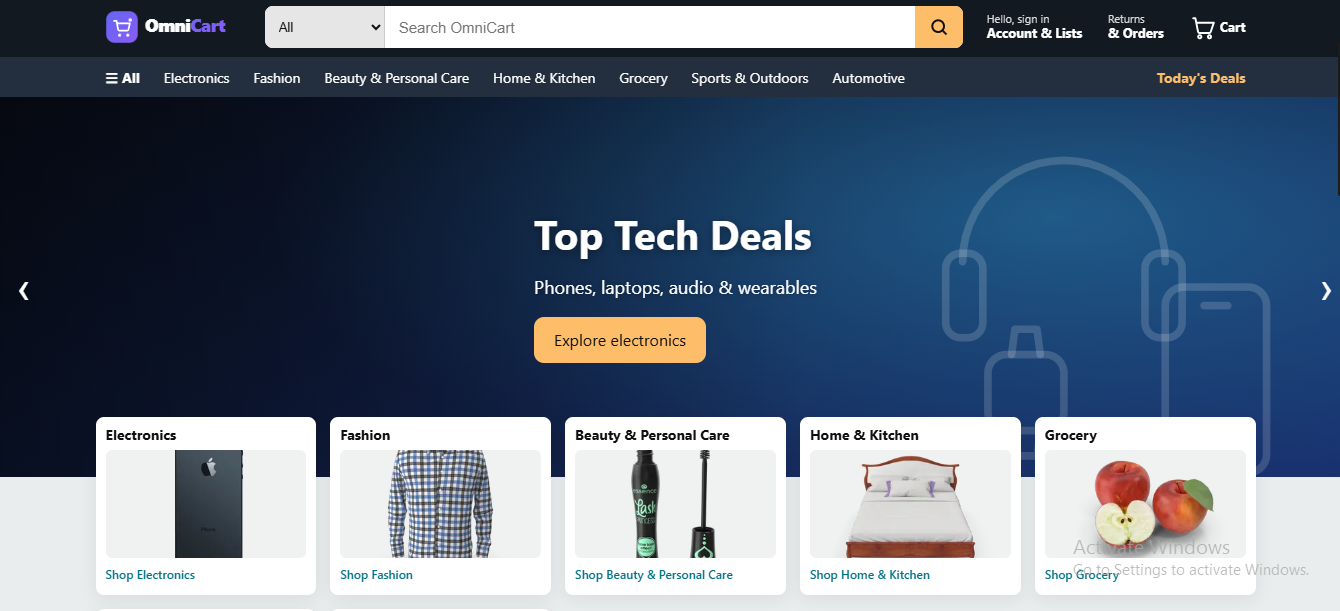
OmniCart — single-vendor commerce with branches & POS
OmniCart — single-vendor commerce with branches & POS
OmniCart is a production-ready e-commerce application built on Laravel 12 and Filament 3. It ships as a complete store: a customer-facing storefront, a full admin panel, checkout, order management, and a point-of-sale screen for selling over the counter. Online and counter sales share one catalog and one inventory.
Storefront
Storefront
- Product catalog with categories, sub-categories and brands
- Product catalog with categories, sub-categories and brands
- Product variations — size, colour, or any attribute you define
- Product variations — size, colour, or any attribute you define
- Search with live suggestions
- Search with live suggestions
- Cart and checkout, with guest checkout
- Cart and checkout, with guest checkout
- Customer accounts with order history
- Customer accounts with order history
- Sign in with email, Google, or a one-time code by SMS
- Sign in with email, Google, or a one-time code by SMS
- Order tracking
- Order tracking
- Product reviews, approved by you before they appear
- Product reviews, approved by you before they appear
- Mobile bottom navigation bar — Home, Shop, Cart, Track, Account
- Mobile bottom navigation bar — Home, Shop, Cart, Track, Account
- Switchable storefront themes, changed without a developer
- Switchable storefront themes, changed without a developer
Admin panel
Admin panel
- Products, categories, brands, attributes and variations
- Products, categories, brands, attributes and variations
- Quantity-break pricing for wholesale customers
- Quantity-break pricing for wholesale customers
- Full order management with status history and delivery labels
- Full order management with status history and delivery labels
- Customer records
- Customer records
- Home page banners
- Home page banners
- Staff accounts with access control
- Staff accounts with access control
- Sales dashboard with charts and latest orders
- Sales dashboard with charts and latest orders
Point of sale
Point of sale
- Sell over the counter from the same catalog and stock
- Sell over the counter from the same catalog and stock
- Search by name, SKU or barcode
- Search by name, SKU or barcode
- Line and order-level discounts
- Line and order-level discounts
- Hold a sale and recall it later
- Hold a sale and recall it later
- Sells from the branch you select
- Sells from the branch you select
Branches and stock
Branches and stock
- Track inventory separately per shop or warehouse
- Track inventory separately per shop or warehouse
- Counter and online sales draw from one inventory — no double counting
- Counter and online sales draw from one inventory — no double counting
Promotions
Promotions
- Percentage, fixed-amount and free-item offers
- Percentage, fixed-amount and free-item offers
- Coupon codes, date ranges and usage limits
- Coupon codes, date ranges and usage limits
Notifications and delivery
Notifications and delivery
- Order emails to customers
- Order emails to customers
- SMS alerts
- SMS alerts
- WhatsApp contact button
- WhatsApp contact button
- Shipping rules by region, weight or order value
- Shipping rules by region, weight or order value
- Delivery partner records
- Delivery partner records
Built for shared hosting
Built for shared hosting
No Node, no npm, no build step, no command line. Upload, extract, open your domain, and the web installer handles requirements, licence, database and admin account. Updates install from the dashboard — upload the release file and press a button.
Requirements
Requirements
PHP 8.2+, MySQL 5.7+ or MariaDB, and the standard Laravel extensions (openssl, pdo_mysql, mbstring, tokenizer, ctype, json, bcmath, fileinfo, curl, gd, xml, zip, intl). The installer checks all of them before you start.
Licensing
Licensing
Each purchase includes a licence key valid for one domain. Enter it during installation to activate.
Attachments
- Product file: omnicart-v1.3.0.zip
- User guide: USER-GUIDE.md (publish on the page, above the buy button)
Checklist before upload
- Version field set to 1.3.0
- Product file replaced with the new build
- Release notes pasted
- Description updated if features changed
- User guide attached or linked
Requirements
PHP 8.2 or higher, MySQL 5.7+ or MariaDB, and these PHP extensions: openssl, pdo_mysql, mbstring, tokenizer, ctype, json, bcmath, fileinfo, curl, gd, xml, zip, intl. The installer checks all of them before you begin. No Node.js, no npm, no command line needed.
1. Prepare your hosting
Point your domain or subdomain at a folder. Create an empty MySQL database and a user with full access to it. Note the database name, username and password.
2. Upload
Upload the OmniCart zip into your domain folder and extract it there. Delete the zip once extraction finishes. The folder should now contain app, public, vendor and artisan.
3. Open your domain
You are taken to the installer automatically.
Step 01 - Requirements. Anything missing is listed with what to fix. Ask your host to enable a missing extension; this is a routine request.
Step 02 - Licence. Enter the licence key from your purchase. It looks like KEY-XXXXXX-XXXXXX-XXXXXX and is locked to this domain.
Step 03 - Database. Enter the details from step 1. Host is usually 127.0.0.1 and port 3306.
Step 04 - Admin account. Create your login with a password of at least 8 characters. Submitting this creates all database tables, so allow a few seconds.
Step 05 - Finish. Your store is live.
4. Sign in
Go to yourdomain.com/admin with the account you just created.
Updating later
Download the new release, then go to System update in your admin sidebar, upload the file and press install. Your products, orders and settings are never touched.
First-time setup
Work through Settings in this order: General (store name, logo, contact details), Currency, Payment methods, Email (send a test before your first real order), SMS and WhatsApp if you use them, Appearance (theme, brand colours, logo), and Shipping rules.
Adding products
Set up your categories and attributes first - doing that once saves time on every product afterwards. Then Catalog > Products > New product: name, description, category, images, price and stock. For products sold in sizes or colours, define the attributes first, then generate variations, each with its own price and stock. Quantity-break pricing is available for wholesale customers.
Orders
Sales > Orders shows every order with customer, items, totals, payment method and delivery address. Change the status as you process it - pending, processing, shipped, delivered - and the customer is notified at each step. You can print a delivery label and record payment against bank transfer orders.
Point of sale
Sales > Point of Sale is for selling over the counter. Search by name, SKU or barcode, adjust quantities, apply discounts, select your branch, and complete the sale. You can hold a sale and recall it later. Counter and online sales share one inventory, so an item sold at the counter is immediately unavailable online.
Branches
If you run more than one shop or warehouse, add each under Settings > Branches. Stock is then tracked separately per location. Running a single shop? Ignore this entirely - the default branch handles it.
Promotions
Catalog > Promotions creates automatic discounts or coupon codes. Percentage off, fixed amount off, or free-item offers, each with optional date ranges and usage limits.
Reviews
Customer reviews wait for your approval before they appear on the product page.
Daily tips
Test your email settings before your first real order, not after. Turn on database backups in your hosting panel. If stock drifts between online and counter, check that counter sales are going through the POS rather than being recorded by hand.
Full guide
A complete user guide is included in your download as USER-GUIDE.md.
Added
- Mobile bottom navigation bar on the storefront - Home, Shop, Cart, Track and Account, always within thumb reach, with a live cart badge.
- The bar highlights the page you are on and clears the iPhone home indicator.
Changed
- Phone-sized header: sticky and shorter on the Modern theme. On the Base theme the search box gets its own full-width row and the category strip scrolls sideways instead of stacking.
Nothing changes on tablet or desktop.
- License client
Do I need coding knowledge to install this?
Will this work on shared hosting?
How many domains can I use one licence on?
Can I sell in my own currency?
Which payment methods are supported?
Does it work on mobile?
Can I use it in a physical shop too?
Are updates free?
Will updating delete my products or orders?
Can I change the design?
What support is included?
Can I get it installed for me?
OmniCart eCommerce Website
A complete Laravel e-commerce platform with storefront, admin panel, POS and multi-branch stock. Installs in five minutes — no build tools, no command line.
Reviews
No reviews yet.