
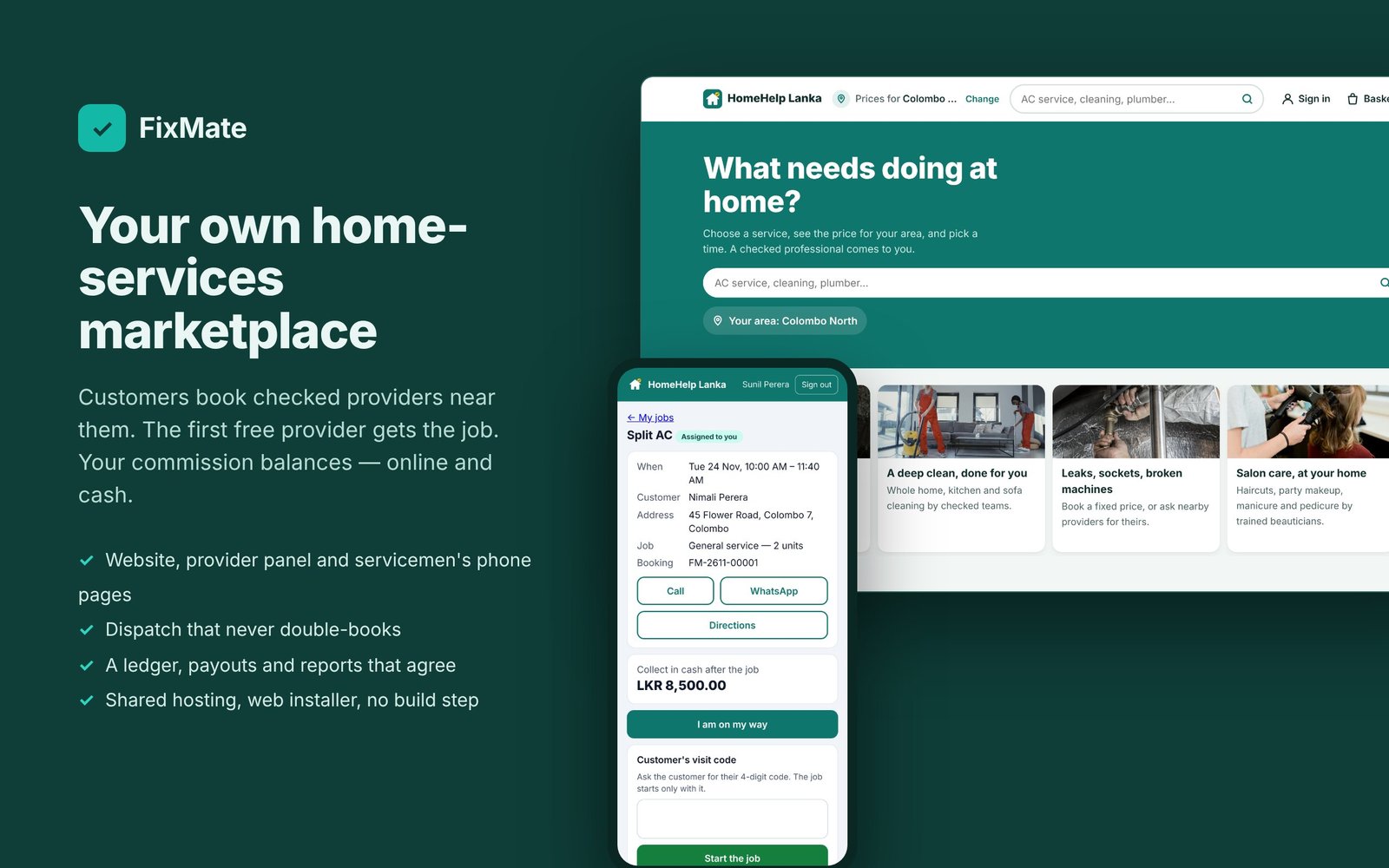
FixMate is a home-services marketplace you run on your own domain: cleaning, AC servicing, plumbing, electrical work,
beauty at home, pest control, painting — any service you choose. Customers book checked providers near them; providers
take the jobs and send their servicemen; you set the prices, approve the providers and keep a commission on every job,
whether the customer paid online or paid the serviceman in cash. It replaces the WhatsApp groups, the phone calls to
whoever is free and the notebook of who owes you commission.
Every booking reaches a real person, exactly once
- Customers only see times when a provider near them really has someone free
- The job is offered to every free provider in the area; the first to accept gets it — twelve accepting at the same
instant still makes exactly one winner
- Nobody accepts in time → it goes to your "Needs a provider" list and staff are alerted; assign any job by hand
- The serviceman starts the job with the customer's 4-digit visit code: proof that he was there
- Providers giving a job back get a strike; staff see every offer and every step in the booking's history
The money balances — online and cash
- Every money movement is a permanent line in each provider's ledger; corrections are new lines, never edits
- Commission per platform, per category or per provider (0 % allowed); frozen on each job
- Cash jobs: the provider holds your commission; a cash limit stops new jobs until they settle
- Online earnings held for the days you choose, then paid out on request with the bank reference recorded
- Refunds, late-cancellation fees, visit fees and coupons (paid by you or the provider) all land in the ledger
- Reports: bookings, revenue and commission, provider earnings and balances, cash owed, cancellations, ratings — CSV
Customers (your website)
- Choose the area from a list, "use my location" or the map; prices follow the area
- Fixed-price services with options, a basket, pay online or in cash after the job, coupons
- "Ask for a price": describe the job with photos; providers nearby send prices; pick one
- A private booking page that updates itself: who is coming, the visit code, photos, extra charges to approve
- Cancel within your rules, review, report a problem; an account, or book as a guest; download or delete their data
- English, Sinhala and Tamil; two looks (Teal, Harbour); every page works on a phone and even with JavaScript off;
search-engine ready (titles, structured data, sitemap)
Providers and servicemen
- Provider panel: job offers, choosing who goes, pricing customers' jobs, team, working hours and time off, pausing a
service or an area, earnings and payout requests, documents, reviews
- Serviceman's phone pages: today's jobs, call / WhatsApp / directions, on my way, start with the code, before and after
photos, extra charges the customer approves, cash collected
- Join page with private ID documents; approve, reject, suspend; or add providers yourself
Your panel
- Service areas drawn on a map (OpenStreetMap — no paid key); categories, services and prices per area
- Messages by e-mail, SMS (SMSlenz, Twilio) and WhatsApp Business, in the customer's language, with your own wording;
a log of every message
- Payments: cash after the job, bank transfer, PayHere, Stripe, PayPal, Razorpay, Flutterwave (each where it takes your
currency); a payment that arrives twice or after a cancellation is never lost
- Staff roles (owner, manager, dispatcher, accountant), branches, currencies, an activity log of every change
Built for shared hosting
- Upload the zip, open your domain, follow the web installer: no SSH, no Composer, no Node; one cron line
- Start with a sample marketplace (one button, with free photographs) or empty
- Updates from the staff panel: upload the new version; your data, photos and settings are never touched
Requirements
- PHP 8.2+ with pdo_mysql, mbstring, openssl, tokenizer, xml, ctype, fileinfo, curl, gd, intl and zip
- MySQL 8 or MariaDB 10.6+; Apache or LiteSpeed with .htaccess; one cron job; HTTPS; an e-mail account
What's included
- The full PHP source, the web installer, the sample marketplace, the user guide, the installation and update guides
- Updates and support: [FILL IN — e.g. 12 months of updates and 6 months of support]
Not in this version (said plainly)
- Mobile apps (the web works on any phone; apps are planned), live GPS tracking, in-app chat, repeat bookings,
customer wallet, provider subscriptions, customers choosing a provider
- iPay.lk (PayHere is the Sri Lankan gateway in this version)
- Staff, provider and serviceman screens are in English; customers get English, Sinhala and Tamil
1. Create an empty MySQL database and a user for it in your hosting panel.
2. Upload the FixMate zip into your domain's folder and extract it there.
3. Open your domain. The installer checks your hosting, connects the database, then asks:
- your business name, country, currency, calling code, time zone and language;
- your first branch;
- your own sign-in;
- the licence key from your CodeCrate account.
4. Add the one cron job (every minute) the last screen shows.
5. Sign in at /admin. To try everything first, press "Load the sample platform" under Settings → Business details.
Updates: download the new zip from your CodeCrate account and apply it from Settings → System update. Your bookings,
photos and settings are never overwritten.
# FixMate user guide
FixMate runs a home-services marketplace on your own domain. Customers book cleaning, AC repair, plumbing, beauty at home
and any other service you list, from checked providers near them. Providers take the jobs and send their servicemen. You
set the prices, approve the providers and keep a commission on every job — whether the customer paid online or paid the
serviceman in cash.
Installing is in **INSTALL.md**; updating is in **UPDATE-GUIDE.md**.
---
## 1. What FixMate is
### Four kinds of people, four places
| Who | Where | What they do |
|---|---|---|
| **You and your staff** | `yourdomain.com/admin` | Service areas, services and prices, approving providers, watching bookings, assigning jobs nobody took, money, payouts, reports, settings |
| **Providers** (a business, or one person working alone) | `yourdomain.com/provider` | Accept jobs, choose which serviceman goes, price jobs customers describe, manage their team and working hours, see what they earned, ask for payouts |
| **Servicemen** | `yourdomain.com/serviceman`, on their phone | Today's jobs, call or WhatsApp the customer, directions, start the job with the customer's code, photos, extra charges, mark it done, cash collected |
| **Customers** | your website | Choose their area, book a fixed-price service at a time that is really free, or describe a job and get prices; pay online or in cash after the job; follow the booking; review |
A provider who works alone is simply a provider with one person who both manages and does the jobs.
### How a booking goes
1. A customer books a service at a time when someone near them is free.
2. Every provider who covers that area and service, and has someone free then, is offered the job.
3. **The first to accept gets it**; the others see it taken. Nobody accepts within 10 minutes (you choose) → it lands on
your **Needs a provider** list and staff are alerted, so a booking never sits unseen.
4. The provider chooses a serviceman. A one-person provider is assigned at once.
5. The serviceman goes, and **starts the job with the customer's 4-digit visit code** — proof that he was there.
6. He finishes; if the customer pays cash, he confirms he collected it.
7. The money is written in the provider's ledger: what they earned, your commission, and for a cash job, the cash they now
hold. Online earnings are paid out after a hold; a provider who collected cash owes you your commission until they settle.
### What you need
| | |
|---|---|
| Hosting | Shared hosting is enough (Hostinger and similar). PHP 8.2+, MySQL 8 or MariaDB 10.6+ (tested on MariaDB 10.11) |
| A domain | With HTTPS — card payments need it |
| One cron job | Every minute. The installer shows the exact line. Dispatch timeouts, payout holds and messages depend on it |
| An e-mail account | For booking e-mails. Can be added after installing |
| Optional | An SMS account (SMSlenz or Twilio), WhatsApp Business (Meta's Cloud API), a payment gateway account |
### What you do **not** need
No SSH, no Composer, no Node, no build step, no Google Maps key (maps use OpenStreetMap), no app store. Everything works in
a phone's browser, for customers, providers and servicemen alike.
### Your licence
- One licence covers one website address. The key is entered during installation and checked in the background.
- If our licence server is ever unreachable, nothing changes for you.
- Only a clear "not valid" answer closes **your staff panel**. The website, customers' bookings, the provider panel and
the servicemen's pages keep working whatever the licence says, so a licence question never strands a customer.
- The code is licensed to you, not sold: it may not be resold or shared.
---
## 2. Installation
Follow **INSTALL.md**: make an empty database, upload and extract the zip, open your domain and answer the installer
(about fifteen minutes), then add the cron job it shows.
**To try everything before entering your own services**, open **Settings → Business details** and press **Load the sample
platform** (owners, on a new platform with a base currency of Sri Lankan rupees). It adds four service areas around Colombo
and Kandy, eight categories of services with prices, ten providers with their people, about thirty customers and two
months of finished jobs, payments and reviews. Everything is made up and nobody is messaged. The sample providers' logins
are shown once, when it finishes. Then **Add sample photographs** downloads free photographs for the categories, services
and home banners (about a minute).
For a clean start afterwards, install again with a new, empty database.
---
## 3. First steps (in this order)
1. **Business details** (Settings → Business details): name, phone, e-mail, address, country and calling code, time zone.
Also **Staff sign-in**: how long a staff screen left alone stays signed in (120 minutes; 0 = never).
2. **Service areas** (Settings → Service areas): draw each area you serve on the map, or let customers pick it by name
(see §6.1).
3. **Categories and services** (Catalogue → Categories, then Services): two levels of categories (AC repair → Split AC),
then the services and their options (1 unit, 2 units…), with how long each takes.
4. **Prices** (Catalogue → Prices): a price for each option in each area. An option with no price in an area is not
offered there.
5. **Money** (Settings → Money): your commission, the payout hold, the cash limit, cancellation fees (§6.4).
6. **Bookings and dispatch** (Settings → Bookings and dispatch): time to accept, the times customers can choose, cash or
online, tax (§6.3).
7. **Payments** (Settings → Payments): switch on the ways customers can pay online, and **Test a gateway** (§6.5).
8. **E-mail** (Settings → Email): your mailbox's SMTP details, then **Send a test email**. Until this is set, no e-mail is sent.
9. **Messages** (Settings → Messages), if you send SMS or WhatsApp (§6.6).
10. **Website** (Settings → Website): theme, home page words, WhatsApp number, search engines (§8.1).
11. **Pages** (Marketing → Pages): **Add the standard pages** creates Terms, Privacy, Refunds, Provider terms and About as
drafts. Have your lawyer write them, then publish.
12. **Your first providers** (Providers → New provider, §6.2) and **Staff** (People → Staff).
Until the main ones are done (business details, areas, services, prices, a provider, staff), the dashboard's **Getting
started** list links to each.
> **An empty marketplace converts nobody.** Before you advertise to customers, sign up your first providers yourself —
> twenty is a good start — so the first customers in each area find someone free. You can add a provider directly, with a
> password you hand them, instead of waiting for applications.
---
## 4. Who sees what (staff)
| Role | Can do |
|---|---|
| **Owner** | Everything, including licence, system update and the sample platform |
| **Manager** | Settings, staff, service areas, catalogue and prices, providers, marketing, bookings, money, reports |
| **Dispatcher** | Bookings: take phone bookings, assign, cancel, price requests, reviews, message log. Can look at providers (to assign well) but decides nothing. No money, no settings |
| **Accountant** | Money: payments, ledger, settlements, refunds, payouts; reports; reads bookings. No settings |
- Each staff member belongs to one or more **branches** and sees only theirs; owners see every branch.
- When someone leaves, switch their account off (People → Staff → **Can sign in**). They are signed out at once; their
history stays.
- A staff screen left alone for longer than the time in Business details signs itself out ("Remember me" is then not offered).
- Changing a password signs that person out everywhere else.
Providers, servicemen and customers have their own sign-ins and can never open the staff panel.
---
## 5. Every day
### Dashboard
- A **red warning** with the cron line if the scheduler has not run in the last five minutes — fix this first (INSTALL.md
step 6).
- **Tiles**: Needs a provider, waiting for providers, jobs today, done today, price requests with no price after a day,
reviews to check, provider applications, approved providers, options with no price.
- **Getting started** until the first steps are done.
- The **bell** at the top: a booking nobody took, a new provider application, a problem reported, a payment that arrived
twice or after a cancellation.
### Bookings (Bookings → Bookings)
Tabs: **Needs a provider** (nobody accepted — assign them), **Waiting** (offers out now), **In hand**, **Completed**,
**Cancelled**, **All**.
**New booking** (a customer on the phone): their phone number finds them if they have booked before; choose the area and
service type, add the services, and the price shows before you save. Choose the date and start time, the address and
whether they pay cash after the job or online. The booking is offered to providers like any other.
**Open a booking** to see:
- status, area, provider, serviceman, how it is paid;
- the **visit code** — read it to a customer who booked by phone; the serviceman needs it to start;
- the address, the services and totals, extra charges and the customer's answers, photos from the job;
- **Money**: what was paid, by which method and reference, what is due, what can be refunded; the provider's ledger lines
for this job;
- the **offers** — who was offered it and who answered;
- the **history** — every step, who did it, when.
Actions: **Assign** (a provider and, if you like, a serviceman — even a provider who does not usually cover the area, but
never a serviceman who is busy or off then), **Send offers again**, **Cancel booking** (with a reason; any fee is worked
out for you), **Pay link** (a private payment link to send the customer), **Record payment received** (cash or a bank
transfer that arrived), **Record refund**, **Resolve the problem** (when the customer reported one).
### Price requests (Bookings → Price requests)
Customers describe a job (with up to five photos) and providers near them send prices. You see every request, its photos,
the prices sent and who could answer. **No price after a day** lists the ones nobody has priced — a good moment to call a
provider. You can close a request with a reason.
### Reviews (Bookings → Reviews)
A customer can review a job once it is done. Reviews **wait here until someone shows them** (or switch on "Show reviews
without checking them first" in Bookings and dispatch). **Show** puts it on the website and in the provider's rating;
**Do not show** keeps it out of every rating. Only first name and initial are shown.
### Message log (Bookings → Message log)
Every e-mail, SMS and WhatsApp message: to whom, which booking, whether it was sent, and the reason if not. **Send again**
for one that did not arrive.
---
## 6. Running the marketplace
### 6.1 Service areas and the map
- Settings → **Service areas** → New service area: a name, a code, and either **draw it on the map** (click to add
corners, drag them, double-click to remove one, Undo) or leave it undrawn and customers pick it by name. You can also
paste corners as text or GeoJSON.
- Where areas overlap, the smaller one wins (a neighbourhood inside a city).
- The list shows all areas on one map; click anywhere to see which area a customer there would get.
- **Map settings**: where the map starts and which tile server draws it. The default is OpenStreetMap's own server, which
asks busy sites to use another; when you have many visitors, use a paid tile service (the address must be https and
contain `{z}/{x}/{y}`).
- An area with providers, prices or bookings cannot be deleted; switch it off instead.
### 6.2 Providers
**Applications.** Your website's **Join as a provider** page lets anyone apply: one person or a company, contact details,
the services and areas they cover, an ID document (photo or PDF), business registration for companies, bank details. You
get a bell. Settings for applications (on/off, documents required, how long rejected applicants' documents are kept) are
under Providers → **Application settings**.
**Reviewing.** Providers → Providers → **Applications** → open one:
- **Documents** open on the page (photos) or download (PDFs). Every opening is recorded in the activity log. Mark each
**Accept**, or **Not accepted** with a note the provider sees.
- **Approve** (needs at least one service and one area), **Reject** with a reason, later **Suspend** with a reason and
**Reinstate**. A rejected or suspended provider gets no jobs; switching one off signs their people out at once.
- Only owners and managers decide. Dispatchers can look.
**Adding a provider yourself**: Providers → **New provider**. It is approved at once; give them the password you set.
**On each provider**: services and areas (paused ones are marked), their own **commission %** and **cash limit** if they
differ from the platform's, bank details (only the last digits are shown), their people, jobs done, strikes (jobs they gave
back), and what they asked to add.
**What providers change themselves**: their team, working hours and time off, logo and description, and **pausing** a
service or an area (on holiday, short of people). Adding a new service or area is asked of you: **Add it** or **Decline**
with a reason, on their page.
ID documents and bank details are stored privately and never shown in full. Rejected applicants' documents are deleted
after the days you set (90 by default).
### 6.3 Bookings and dispatch settings
Settings → **Bookings and dispatch**:
| Setting | Default | What it decides |
|---|---|---|
| Time to accept | 10 minutes | After this, the booking goes to Needs a provider and staff are alerted |
| Earliest booking | 60 minutes | How soon from now a booking may start |
| Booking number prefix | FM | Numbers look like FM-2611-00042 (year, month, number) |
| Wrong visit codes allowed | 5 | After this, the job locks until staff help |
| Time to dispute a completed job | 3 days | How long a customer can report a problem |
| Cash after the job / online | both on | Which ways customers can pay |
| Prices include tax | yes | Each booking keeps the rule it was made with. Ask your accountant |
| No cash above | no limit | Bigger bookings must be paid online |
| Times on the website | 08:00 to 18:00, every 30 minutes, 14 days ahead | A job is only offered if it ends by the closing time |
| Price requests | take prices for 3 days; a price holds for 48 hours | |
| Show reviews without checking | off | |
**Only times when someone is really free are offered**: a provider for that area and service, approved, not paused, not
over their cash limit, with a serviceman whose working hours cover the job and who has no other job then.
### 6.4 Money
**The books.** Every money movement is a line in the provider's **ledger** that can never be changed or deleted —
corrections are new lines. A provider's balance is the sum of their lines:
| A job of Rs 6,000 at 15 % commission | Ledger lines | Balance |
|---|---|---|
| Paid online to you | +6,000 earning · −900 commission | **+5,100** — you owe the provider |
| Paid to the serviceman in cash | +6,000 earning · −900 commission · −6,000 cash collected | **−900** — the provider owes you |
Settings → **Money**:
| Setting | Default | |
|---|---|---|
| Platform commission | 15 % | A category or a provider can have its own rate; that wins. 0 % is a real rate |
| Cash limit per provider | 25,000 | A provider who owes you more gets no new jobs until they settle |
| Hold online earnings | 7 days | So refunds and disputes can still come off them before a payout |
| Smallest payout | 5,000 | |
| How providers pay what they owe | — | Your bank details and the reference to write, shown on their Earnings page |
| Late cancellation window and fee | 3 hours, 0 % | A customer cancelling closer than this keeps this share of the total from the refund |
| Fee when a provider gives a job back late | none | Taken from their balance |
Amounts are in your base currency.
**Finance screens:**
- **Provider balances** — each provider's balance, what can be paid out now, their cash limit. **Record settlement** (on
a provider who owes you) records money they paid you, with its reference. **Adjust** adds a correction line, with a
reason.
- **Ledger** — every line, filterable by provider and type.
- **Payouts** — providers ask from their Earnings page (bank details needed, above the minimum, no more than what is
available). **Approve**, pay it from your bank, then **Mark paid** with the transfer reference. Or **Reject** with a reason.
- **Payments** — every payment received, by gateway and reference.
**Refunds**: on the booking, **Record refund** (not more than was paid, with a reason). After a completed job, the
provider's share of the refund comes back off their balance in proportion, and the commission with it. Refunds through
Stripe, PayPal, Razorpay or Flutterwave are made in that gateway's dashboard, then recorded here.
**Price requests and visit fees**: a provider pricing a job can include a visit fee. If the customer accepts and then
cancels late, the visit fee goes to the provider (less your commission).
**Coupons** (§8.3) are paid by the platform unless marked "provider pays".
### 6.5 Payments
Settings → **Payments**. Switch on each way you want customers to pay, then **Test a gateway** — it says exactly what is
wrong (wrong key, test key with Sandbox off…).
| Method | Currencies | Notes |
|---|---|---|
| **Cash after the job** | any | The serviceman confirms what he collected |
| **Bank transfer** | any | Your instructions are shown on the pay page; you record the payment when it arrives |
| **PayHere** | LKR, USD | Merchant ID and secret for this domain |
| **Stripe** | most | Secret or restricted key, plus a webhook (address and events shown). Stripe does not open accounts for Sri Lankan businesses |
| **PayPal** | 25 currencies, not LKR | Client ID and secret, plus a webhook |
| **Razorpay** | many, including LKR on accounts with international payments | Key ID and secret, plus a webhook |
| **Flutterwave** | NGN, USD, KES and others, not LKR | Secret key, plus a webhook; asks the customer's e-mail |
- A method that does not take your currency is simply not offered.
- **Sandbox** first: try one payment with test money before switching to live keys.
- Keys and secrets are stored encrypted and never shown back or written to the activity log.
- A payment is only counted when the gateway confirms it to FixMate directly, never just because the customer came back.
A payment that arrives twice, for a different amount, or after the booking was cancelled is never lost: it is kept, noted
on the booking, and staff are alerted so you can refund it.
### 6.6 Messages: e-mail, SMS and WhatsApp
Settings → **Messages**:
- **SMS**: SMSlenz or Twilio. Enter the account details, **Check the SMS account**, then **Send a test SMS** to your phone.
- **WhatsApp Business (Cloud API)**: your WhatsApp Business account's phone number ID and a permanent token from Meta
Business Manager, then a **template name** for each message you want on WhatsApp. Templates must be approved by Meta
(category Utility). A message with a template goes by WhatsApp instead of SMS; if WhatsApp refuses it, it goes by SMS.
- **Which messages go out**: switch each one on or off for e-mail and SMS.
| To | Messages |
|---|---|
| Customers | Booking received · a provider accepted · serviceman assigned (who is coming) · on the way (with the visit code) · extra charge to approve · job done (asks for a review) · cancelled · reported problem resolved |
| Providers | New job offered · price accepted · job cancelled · payout paid |
| Servicemen | A job assigned to them |
| Staff | A booking nobody took · a problem reported |
- Settings → **Message wording**: rewrite any message in each language. Leave a box empty for the standard wording. You
can use `:name :ref :service :date :time :link :shop :provider :serviceman :serviceman_phone :code :amount :total
:reason :area`.
- Customers get messages in their own language (English, Sinhala or Tamil); providers, servicemen and staff in English
unless you reword them.
- Messages are sent by the scheduler within a minute. A message still waiting after 6 hours is not sent (news goes stale).
- Every message is in **Bookings → Message log**.
### 6.7 Reports (owners, managers, accountants)
Reports → choose the report, the dates (or Today, Last 7 days, Last 30 days, This month, Last month, This year) and how to
group it:
- **Bookings** — by day, category, area, provider or status: bookings, completed, cancelled, value booked and completed.
- **Revenue and commission** — jobs, value, tax, commission, cancellation fees kept, coupons you paid for, your income,
refunds.
- **Provider earnings and balances** — what each earned, your commission, cash they collected, what they paid you, what
you paid out, their balance now.
- **Cash owed by providers** — who owes you, against their limit, since when.
- **Cancellations** — by who cancelled, with the reasons.
- **Ratings by provider**.
Figures are worked out from the books every time, so they always agree with the ledger. **Download CSV** opens in Excel.
### 6.8 Customers
Customers → every customer, whether they made an account or booked as a guest, their area and bookings. **Switch off**
stops someone booking (and signs them out).
**Their data** (owners and managers): **Download their data**, or **Erase this customer** with a reason when they ask.
Erasing removes their name, phone, e-mail, addresses, photos and their words, but keeps the bookings and money under
"Erased customer" so your books still balance. It is refused while they have a booking ahead, a dispute window open or
money owed back — the page says which. Customers can do both themselves from their account.
---
## 7. Providers and servicemen
### 7.1 The provider panel (`/provider`)
A provider's manager signs in with their e-mail and password.
- **Home** — the account's state (waiting for approval, approved, suspended) and what to do next.
- **Jobs** — **new job offers** (the area and time, never the street address until the job is theirs; first to accept
wins; the page checks every 30 seconds), **accepted — choose who goes**, and **coming up** with the option to change the
serviceman. A job can be given back with a reason (that counts as a strike).
- **Quotes** — customers' jobs to price (description, photos, area — the address and phone come only with the booking if
their price is accepted); send a price for the whole job, a visit fee, how long it takes and when they can come.
- **Team** — add people (name, mobile number, whether they manage and/or do jobs, a password), their **working week**
(or "any time"), **time off**. Nobody holding a job can be switched off, and time off cannot cover a job they hold.
- **Business** — logo and description customers see with their prices; **Pause** a service or area; ask to add one.
- **Earnings** — the balance, what can be paid out now, what is on hold, **Ask for payout**, bank details, every ledger line.
- **Documents** — their ID and business documents, with your notes; send a new copy.
- **Reviews** — their rating and the reviews you have shown.
### 7.2 The serviceman's pages (`/serviceman`)
Made for a cheap phone: big buttons, little to read. A serviceman signs in with his **mobile number** and password.
- **My jobs** — today and coming up, then recently done.
- **On a job**: when, the customer, the address, the job and how much cash to collect; **Call**, **WhatsApp**,
**Directions** (opens the phone's maps; no key needed).
- **I am on my way** → the customer is told.
- **Start the job** — with the customer's 4-digit visit code. A wrong code says how many tries are left.
- **Photos** — before (from on the way) and after (while working and up to 24 hours later). The customer sees them.
- **Extra charges** — something more was needed (a part, another unit): he adds it with its price; the customer approves on
their phone, or tells him a second code. Nothing extra is charged without the customer's yes, and the job cannot be
finished while a charge is waiting.
- **Done** — for a cash job, he confirms the amount he collected.
The customer's address and phone are shown from when the job is accepted until 24 hours after it is done; then hidden.
---
## 8. The customer's website
### 8.1 Look and words
Settings → **Website**:
- **Theme**: **Teal** (white header, a teal welcome band, services as rows with the price for the customer's area) or
**Harbour** (navy and saffron, the name centred over a full-width search). Switch any time.
- **Home page words** per language; leave empty for the standard wording.
- **WhatsApp number** shown on the site, and whether to show **Join as a provider**.
- **Search engines**: the home page's title and description in Google, a picture for links shared on WhatsApp and Facebook,
Google Search Console and Bing codes, and Google Analytics (optional — it then loads Google's script on every page; say
so in your privacy page).
- Each category and service can have its own search title and description.
- The site makes its own `sitemap.xml` and `robots.txt`; submit the sitemap in Search Console.
### 8.2 What customers can do
| Customers can | |
|---|---|
| Choose their area | From a list, with "use my location", or by tapping the map. Prices follow the area |
| Book | Services from one subcategory in a basket, a day and a time that is really free, the address (and a pin), how to pay. No account needed |
| Ask for a price | For jobs that need a look: describe it, add photos, tick up to three days. Prices from providers near them arrive on the same page, cheapest first, with each provider's rating |
| Follow the booking | On a private page (the link is in their messages): who is coming, the **visit code**, the steps, photos, extra charges to approve. It updates itself |
| Pay | Online, by the methods you switched on, or cash after the job |
| Cancel | Until the serviceman is on the way; a late fee is shown before they confirm. After that they call you |
| Review | Once the job is done |
| Report a problem | Within the dispute time (3 days); staff are told and resolve it with a note the customer sees |
| Have an account | Sign in with e-mail or mobile: bookings, price requests, saved addresses, password. A guest can turn their booking into an account from the booking page |
| Their data | **Download my data**, or **Delete my account** once nothing is open |
Every page works on a phone, and with JavaScript switched off.
### 8.3 Marketing
- **Coupons** (Marketing → Coupons): a percentage (with a cap) or a fixed amount; from and until dates; a minimum booking;
uses in total and per customer; first booking only; only some services or areas; **who pays** — the platform (the
provider earns on the full price) or the provider (agree it with them first). A cancelled booking gives its use back.
- **Banners** (Marketing → Banners): a picture, a title and a line, a link to a page of your site or an https address, and
dates. Shown on the home page in the order you drag them.
- **Pages** (Marketing → Pages): written with simple formatting (headings, bold, lists, links). Drafts are not on the site;
switch on **In the footer** to link a page at the bottom of every page.
### 8.4 Languages
- The website, the booking and pay pages, and customer messages are in **English, Sinhala and Tamil**. Switch Sinhala or
Tamil on in Settings → Languages; visitors pick theirs at the bottom of every page.
- Your own words — category and service names, descriptions, home page, pages, banners — are typed per language in each
item's language tabs. Anything left empty shows in the first language.
- The staff panel, the provider panel and the servicemen's pages are in English.
- Other languages in the list can be switched on; until they are translated they show the built-in words in English.
---
## 9. Settings you will rarely touch
- **Branches** — each location with its own address, phone and time zone. Staff, areas and bookings belong to a branch.
With one branch you can ignore them.
- **Currencies** — the base currency is fixed at installation. Others can be added with a rate.
- **Activity log** — who changed what and when: settings, prices, staff, providers, documents opened, payouts, refunds.
- **Licence** — the key's state; **Check now**.
- **System update** — apply a new version (UPDATE-GUIDE.md).
---
## 10. Tips, questions and support
### Storage
Photos are resized when they are uploaded: a job photo takes about 0.2–0.4 MB. A thousand jobs with four photos each take
roughly 1–1.5 GB. ID documents are up to 10 MB each. Watch your hosting's disk space as you grow.
### Backups
FixMate does not back itself up. Use your hosting's backups (Hostinger makes them daily) and download a copy of the
database now and then (phpMyAdmin → Export). Private files (ID documents, job photos) are in `storage/app/private`;
public pictures in `public/uploads`.
### Questions
| Question | Answer |
|---|---|
| Bookings stay on "Waiting" for ever; nothing times out | The cron job is missing or failing (INSTALL.md step 6). The dashboard shows a red warning |
| A customer says no time is free | Check: a provider is approved for that area and service, not paused, under their cash limit, with someone whose working hours cover the job; the option has a price in that area; the times in Bookings and dispatch |
| A provider gets no jobs | Same list — the cash limit is the usual reason. Providers → Provider balances shows who is over it |
| A customer got no SMS | Bookings → Message log says whether it was sent and why not. Messages are never sent from the demo |
| A payment shows as waiting | Open the booking: a gateway payment counts only when the gateway confirms it. Stripe, PayPal, Razorpay and Flutterwave are also checked every ten minutes |
| Where are the Sinhala/Tamil words? | Built-in words are translated. Your own (services, home page) need typing in each item's language tab |
| Can providers set their own fixed prices? | No — you set fixed prices per area. Providers set their own price when they price a job a customer described |
| Can I take the commission from providers some other way? | Commission is the model in this version. A provider can have their own rate, including 0 % |
| Cash leakage — a provider takes the customer's number and goes direct | The address and phone are hidden until the job is theirs and 24 hours after; the visit code proves each visit. Nothing can stop it entirely; a fair commission and steady jobs are the best defence |
### Updates and support
New versions are applied in Settings → System update (owner only); step by step in **UPDATE-GUIDE.md**. Your settings,
photos and data are never touched.
Support is through your CodeCrate account. Say what you did, what you expected and what the page said.
- Version 1.0.0 — first release
- Added
- Customer website: areas, fixed-price services with options, real free times, booking, price requests with photos, private booking page, reviews, problem reports, accounts, data download and deletion; English, Sinhala, Tamil; two themes
- Dispatch: offers to every free provider nearby, first to accept wins, escalation to staff, manual assignment, visit codes, strikes
- Provider panel and servicemen's phone pages: offers, team, hours and time off, pricing jobs, photos, extra charges, cash collected, earnings and payouts
- Money: ledger, commission per platform/category/provider, cash limits, holds, settlements, payouts, refunds, fees, coupons; reports with CSV
- Payments: cash, bank transfer, PayHere, Stripe, PayPal, Razorpay, Flutterwave; messages by e-mail, SMS and WhatsApp
- Service areas on a map, provider applications with private documents, staff roles, branches, currencies, activity log
- Web installer, sample marketplace from one button, updates from the staff panel
Do I need coding knowledge to install this?
Will it work on shared hosting? Which PHP/MySQL versions?
How many domains does one licence cover?
What payment methods do you accept?
Does it work on mobile?
Are updates included, and for how long?
Is my data safe / where is it stored?
Can two providers both get the same job?
How does commission work on cash jobs?
Is it available in Sinhala or Tamil?
FixMate — Home Services Marketplace (Bookings, Providers, Dispatch, Commission & Payouts)
Run your own home-services marketplace: customers book checked providers near them, the first free provider gets the job, and your commission balances — online and cash.
Reviews
No reviews yet.
You may also like
A searchable noticeboard website for one town — buy and sell, jobs, land, shops and notices, posted from a phone in Sinhala, Tamil or English.
CV bank, job pipelines and anonymised shortlists for recruitment agencies — local and overseas placements, fees and your own jobs website.
Run a travel agency's tickets, visas, tours and website in one system — margins, part payments, refunds and visa files done right.
Run your own sports venue booking platform: venues sign up, list grounds and take bookings and payments online — academies included, no coding needed.
