
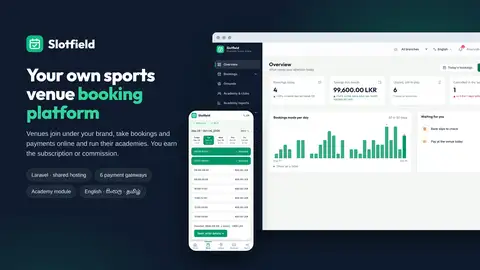
Slotfield is a complete online booking platform for sports venues — cricket grounds, futsal and badminton courts, tennis courts, halls, pools and academies. Install it on your own domain and run it as your own business: venues register under your brand, list their grounds and take bookings and payments online, and you earn a monthly subscription or a commission on every booking. It replaces phone-and-notebook bookings, double-booked slots and chasing payments.
For customers
• Venue directory with search, sport and city filters and a map
• Book without signing up — name and phone, pay, and a private link to manage the booking; an account is offered afterwards, prefilled
• Live 7-day slot grid; book several slots at once, or repeat weekly/fortnightly
• Made for phones: a bottom navigation bar, one day at a time with big slot buttons, nothing to pinch or scroll sideways
• Pay online (iPay, PayHere, Stripe, PayPal, Razorpay, Flutterwave), by bank transfer with slip upload, or at the venue
• Coupons, receipts, reschedule requests, cancellations and refunds, reviews
• Email, SMS and WhatsApp confirmations and reminders
• Sign in with email or phone; download or delete their own data
For venues
• Grounds with photos, amenities, per-hour or per-slot pricing and weekly timetables
• An overview that shows what needs attention: today's bookings, takings, unpaid bookings still to play and cancellations — each compared with last week or month and one click from the list — plus a 30-day chart and a "waiting for you" list (slips to check, cash due today, refund and date-change requests, reviews)
• Bookings list with search (reference, name, phone), status, payment and date filters: confirm, verify bank slips, change dates, refunds, week view
• Coupons, reviews, revenue reports, tax on bookings
• Several locations? Branches with their own grounds, staff and reports, and a combined view across all of them
• Staff accounts; own SMS, WhatsApp and email settings and their own message wording; optional verification code before payment
• Academy module: clubs, members with QR ID cards, coaches, timetable, attendance and check-in, fee collection, outstanding dues, academy reports, and a member portal
For you, the platform owner
• Subscription and commission packages, add-ons that unlock modules (Academy, Multiple branches…)
• Venue billing: invoices, slip verification, venue wallets and withdrawals
• Affiliate programme with flat or recurring commissions and tiers
• Analytics, CMS pages, blog and announcements
• Six online gateways side by side, each with sandbox mode and a connection test; reconciliation that asks the gateway, refunds through Stripe / PayPal / Razorpay / Flutterwave, and a log of every gateway callback
• SMS through SMSlenz, Text.lk, OzoneDesk, Twilio, Vonage, Plivo, Textlocal, MSG91, Amazon SNS or any HTTP API; WhatsApp through Meta's Cloud API, Twilio or any HTTP API; every email and text editable per language
• Brand, time zone, SMTP and SMS from the owner panel — no file editing
• Site themes: pick the look of the public site in one click (two included); make your own by copying a folder
• Separate staff and customer sign-in, sign-in and code limits, staff idle sign-out, terms acceptance recorded
• Multi-currency: venues can price in different currencies; your reports convert to your base currency
• Multi-language: English, Sinhala and Tamil included; add any language (right-to-left too) and reword any text from the owner panel
Built for shared hosting
No Node, no build step, no SSH: a web installer sets everything up, and new releases install from the owner panel.
Requirements
PHP 8.2+, MySQL 8 or MariaDB 10.4+, Apache or LiteSpeed, PHP extensions bcmath, ctype, curl, fileinfo, gd, mbstring, openssl, pdo_mysql, tokenizer, xml, zip. One cron job.
What's included
Full PHP source, web installer, in-app updater, User Guide, Install Guide and Update Guide. One licence = one platform domain with unlimited venues and customers. Updates: [update period]. Support: [support period].
Slotfield installs in your browser — no SSH, Composer or Node needed.
Requirements
• PHP 8.2 or newer
• MySQL 8.0+ or MariaDB 10.4+
• Apache with mod_rewrite, or LiteSpeed (standard on shared hosting)
• PHP extensions: bcmath, ctype, curl, fileinfo, gd, mbstring, openssl, pdo_mysql, tokenizer, xml, zip
• SSL recommended (most payment gateways require it)
1. Create a database
In your hosting panel, create an empty MySQL database and a database user with all privileges on it. Note the database name, username and password.
2. Upload and extract
Upload the Slotfield zip into the folder of your domain or subdomain (for example public_html/ or public_html/booking/) and extract it in that folder. The files land directly there — there is no wrapper folder — and the included .htaccess serves the app from that folder. Nothing else to configure.
3. Run the installer
Open your domain in a browser. The installer starts automatically:
• Requirements — fix anything marked ✕ (usually a PHP extension or a folder permission), then reload
• Licence — enter the licence key from your CodeCrate account; it activates Slotfield for this domain. If the licence server can't be reached right now, you can continue — activation finishes automatically later
• Database — the details from step 1. A wrong password or database name is explained in plain words
• Tables — creates the tables and default settings
• Platform owner — your platform's name, time zone, country for phone numbers, base currency, default language, and the owner account you will sign in with
When it finishes, the installer locks itself.
4. First sign-in
Sign in at your-domain/staff/login with the owner email and password you chose. The installer's last screen links to it.
5. After installing
• Cron job (required) — in your hosting panel's cron section, every minute: cd /path/to/slotfield && php artisan schedule:run (the installer's last screen shows the exact path). It sends booking reminders and review requests, releases unpaid bookings and re-checks the licence
• Email — Owner panel → Platform settings → Platform email (SMTP), so customers receive confirmations
• Brand & time zone — Owner panel → Platform settings → Brand & region
• Payments — Owner panel → Payment gateways: Set up → paste your keys → Save → Test connection → Switch on
Updating
Owner panel → System update: upload the new release zip (or put it in the Slotfield folder with File Manager), then press Update. Your settings, database and uploaded files are kept, and the site comes back online by itself. When a newer release exists, System update tells you.
If something goes wrong
• "500 Server Error" on the first visit — make sure the whole zip was extracted, and that storage/ and bootstrap/cache/ are writable (775)
• Pages show without styling — the public/css folder is missing: extract the zip again
• Need to run the installer again — delete storage/installed and use a new empty database
The full User Guide — in the download and in the documentation PDF on this page — covers every screen. The short version:
First-time setup (platform owner) — in this order, a few minutes each
1. Brand & region — Owner panel → Platform settings → Brand & region: platform name, support email and phone, time zone, the country for phone numbers, and how long staff stay signed in while idle
2. Platform email (SMTP) — Platform settings → Platform email (SMTP). Press Test to check it
3. Platform SMS — Platform settings → Platform SMS gateway: SMSlenz, Text.lk, OzoneDesk, Twilio, Vonage, Plivo, Amazon SNS, Textlocal, MSG91 or any provider with an HTTP API. Send test shows the provider's own answer
4. Languages — English, Sinhala and Tamil are complete and switched on. Add another language or reword any text from Owner panel → Languages
5. Currencies — your base currency was chosen in the installer. Switch on any other currency venues may use and enter its rate
6. Payment gateways — for each gateway you use: Set up → Sandbox → paste the keys → Save → Test connection → Switch on. Make one small sandbox payment, check it in Reconciliation, then switch to Live
7. Packages — subscription or commission packages for venues, and add-ons that unlock modules such as the Academy
8. Cron job — every minute: cd /path/to/slotfield && php artisan schedule:run
Daily operation
• Platform owner — the Overview shows bookings today, income this month, venues open and new customers, each compared with the period before, plus a "Waiting for you" list. Venue invoices and slip checks, venue wallets and withdrawals, Reconciliation for online payments, analytics, CMS pages, blog and announcements
• Venues — the Overview answers "what needs me?": today's bookings, takings, unpaid bookings still to play and cancellations, plus slips to check, cash due today, refund and date-change requests and reviews. From Bookings: confirm, verify a bank slip, record a cash payment, change the date, print the receipt. Also a week timetable per ground, coupons, reviews, reports and billing
• Academy (module) — clubs, members with QR ID cards, coaches, timetable, attendance and check-in, fee collection, outstanding dues, reports and a member portal
• Customers — find a venue, pick slots on the 7-day grid (one day at a time on a phone), pay online, by bank slip or at the venue, and manage the booking from the private link or their account
Updates
Owner panel → System update: upload the new release zip and press Update. Settings, database and uploads are kept.
The full guide — every screen, the booking rules, branches, the academy and troubleshooting — is USER-GUIDE.md in the download.
- Added
- Customer booking: venue directory with map, grounds search, booking without an account, 7-day slot grid (one day at a time on phones), weekly/fortnightly repeats
- Payments: iPay, PayHere, Stripe, PayPal, Razorpay, Flutterwave, bank transfer with slip, pay at the venue — several at once, sandbox mode, connection test
- Reconciliation: check with the gateway, record with reference, gateway refunds, log of every gateway message
- Venue panel: overview of what needs attention, filterable bookings, slip verification, cash, date changes, refunds, timetables, coupons, reviews, reports, tax
- Branches: several locations per venue with their own grounds, staff and reports
- Academy module: clubs, members with QR ID cards, coaches, timetable, attendance and check-in, fees, dues, member portal
- Owner panel: packages and add-ons, venue invoices and wallets, affiliates, analytics, CMS, blog, announcements
- Messages: email, SMS (nine providers or any HTTP API) and WhatsApp, every text editable per language
- Languages: English, Sinhala and Tamil; add any language, right-to-left supported; translate every text from the panel
- Currencies: venue currencies with exchange rates; reports in your base currency
- Accounts: separate staff and customer sign-in, email or phone sign-in, sign-in limits, staff idle sign-out, data export and delete
- Themes: two site themes chosen in Appearance; make your own from a folder
- Installation: web installer for shared hosting; updates install from the owner panel with a new-version notice
Do I need coding knowledge to install this?
Will it work on shared hosting? Which PHP/MySQL versions?
How many domains does one licence cover?
Which payment gateways does it support?
Which languages does it support?
Does it work on mobile?
Are updates included, and for how long?
Is my data safe / where is it stored?
Slotfield — Sports Venue Booking & Academy Platform (Laravel)
Run your own sports venue booking platform: venues sign up, list grounds and take bookings and payments online — academies included, no coding needed.
Reviews
No reviews yet.